Some VIM commands! Vim is case sensitive.
VIM Picture!
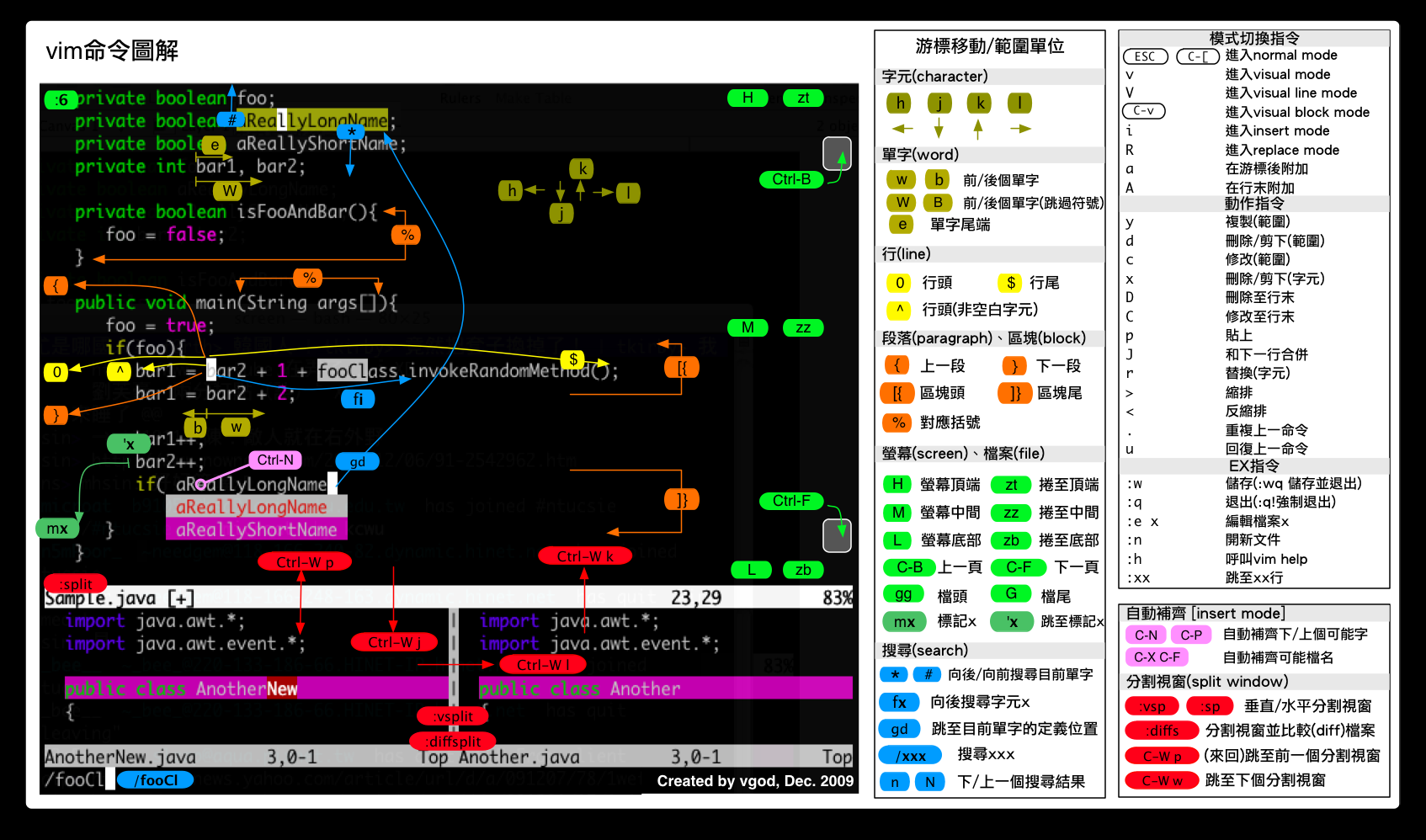
Copy-Past-Delete
Copy
Copy the current line where the cusor locate in.
yyCopy n lines from the current line.
nyyPast
Past to the next line.
pPast to the previous line.
PDelete
Delete characters from the current cusor to the end of line.
DDelete the current line where the cusor locate in.
ddDelete n lines from the current line.
nddDelete from the first line to the current line where the cusor locate in.
d1GDelete the character where the cusor locate in.
xDelete n characters after the cusor(ps: include it).
nxDelete the character before the cusor.
XDelete n characters before the cusor(ps: not include it).
nXSearch-Replace-Undo
Search
Search down from the place of the Cusor.
/strSearch up from the place of the Cusor.
?strSearch the next one.
nSearch the previous one.
NReplace
Replace all ‘abc’ to ‘123’.
:%s/abc/123/gReplace ‘abc’ to ‘123’ one by one.
:%s/abc/123/gcUndo
Undo the last operation.
uRepeat the last undo operation.
ctrl + rRestore the file to the initial state.
:e!Insert-Save-Quit
Insert
Insert before the cusor.
iInsert at the begin of the line where the cusor locate in.
IInsert after the cusor.
aInsert at the end of the line.
AInsert at the next line.
oInsert at the previous line.
OReplace
Replace the character where the cusor point to.
rChange to the ‘Replace Mode’ from the cusor’s place.
RExit the ‘Edit Mode’.
ESCSave
Save the content.
:wForced save.
:w!Save file as fileName.
:w fileNameSave file from the n1 line to the n2 line as fileName.
:n1,n2 w fileNameQuit
Quit the file.
:qForced quit.
!qForced save and quit.
wq!Save and Quit
:xCusor Movement
Left-Down-Up-Right
h j k lThe cusor move to the beginning of the line.
0The cusor move to the end of the line.
$The cusor move to the end line of the file.
GThe cusor move to the first line of the file.
ggThe cusor move to the n line.
nGor
:n<Enter>Move down n lines.
n<Enter>Move back n characters.
n<Space>Page up.
ctrl + bor
pageupPage down.
ctrl + for
pagedownBlock Operation and Multiple file editor
Block Operation
Select character
vSelect line.
VSelect Block
ctrl + vCopy the selected data.
yDelete the selected data.
dMultiple file editor
Edit two files at the same time.
vim file1 file2List the file list.
:filesEdit the next one.
:nEdit the previous one.
:NMultiple window operation and Other operations
Multiple window operation
Open another file when one file was opened.
:sp file2Switch window down.
Press 'ctrl + w', then press 'j'Switch window up.
Press 'ctrl + w', them press 'k'Other operations
Show the line number.
:set nuDo not show the line number.
:set nonuInsert the content of the file of ‘filename’ to the place of the cusor.
:r filenameLeaving vim for a while and execute the command ‘command’.
:!command